Track each decision
Timeline-based save history and visualization
See each save point at a glance and jump back to the exact branch you want without losing your run context.
Manage alternate routes, timeline-based save history, and repeat playthroughs from one focused desktop tool.
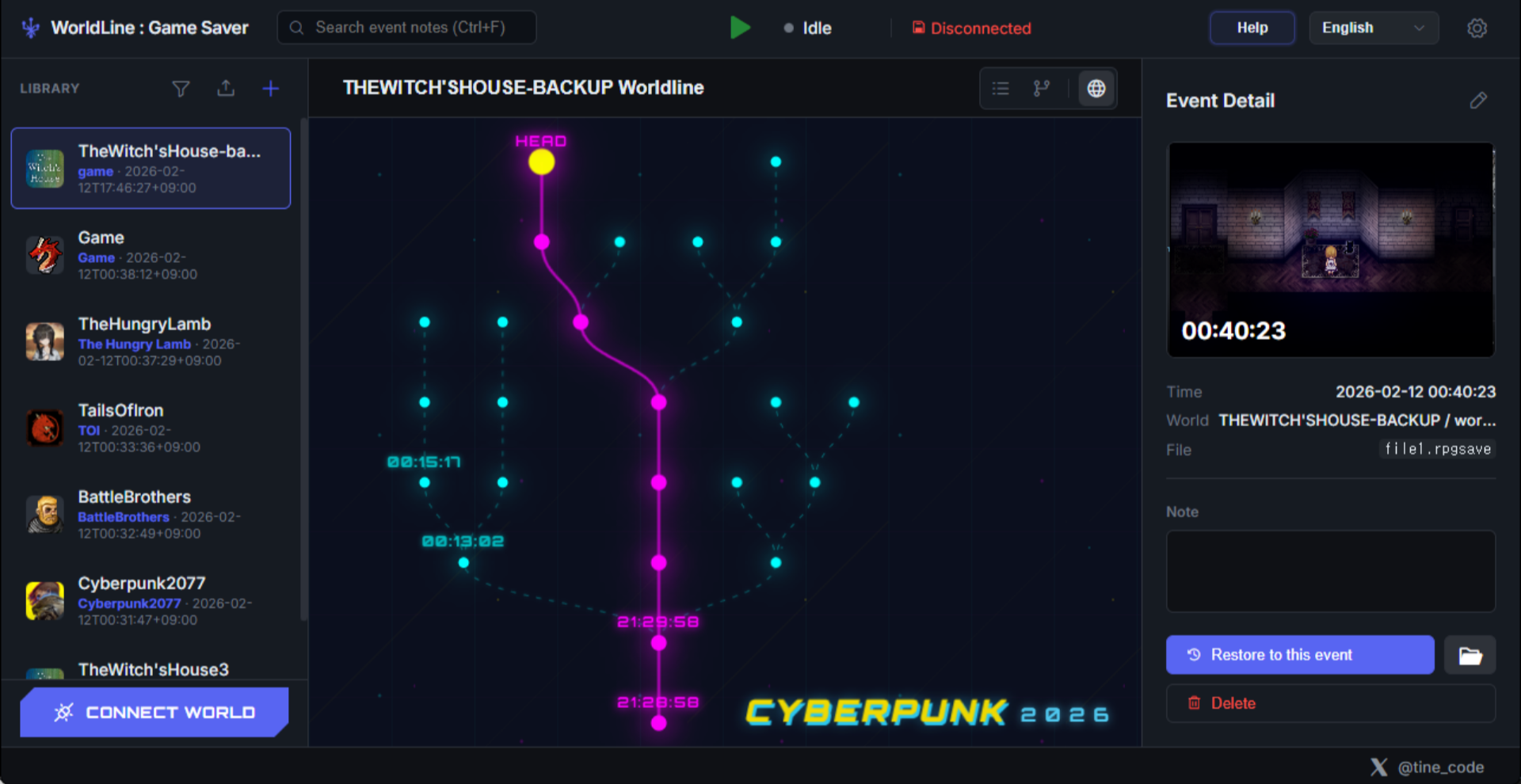
WorldLine detects game save files automatically and organizes them into timelines and branches, making branching playthroughs easier to manage.
Use the pages below to move between installation, the in-app guide, FAQs, and release notes.
Track each decision
See each save point at a glance and jump back to the exact branch you want without losing your run context.
Track each decision
A dedicated save window stays available over the game so you can handle saves without breaking the flow.
Tailor the interface
Choose a theme that fits your setup and play style for a more comfortable long-session experience.
Move straight to installation, the in-app guide, FAQs, and the latest release notes.
See what WorldLine does for branching saves, repeat runs, and timeline-based restore workflows.
Learn moreDownload, install, and complete first-run setup plus Patreon access checks from one page.
Learn moreA detailed user guide for managing game saves with WorldLine.
Learn moreRead answers about saves, backups, downloads, Patreon access, and support.
Learn moreCheck the latest WorldLine updates, release history, and patch note highlights.
Learn more